
Technical Analyst Agent™ – Automated Market Intelligence for Chart Analysis, Indicators & Price Action
January 26, 2026
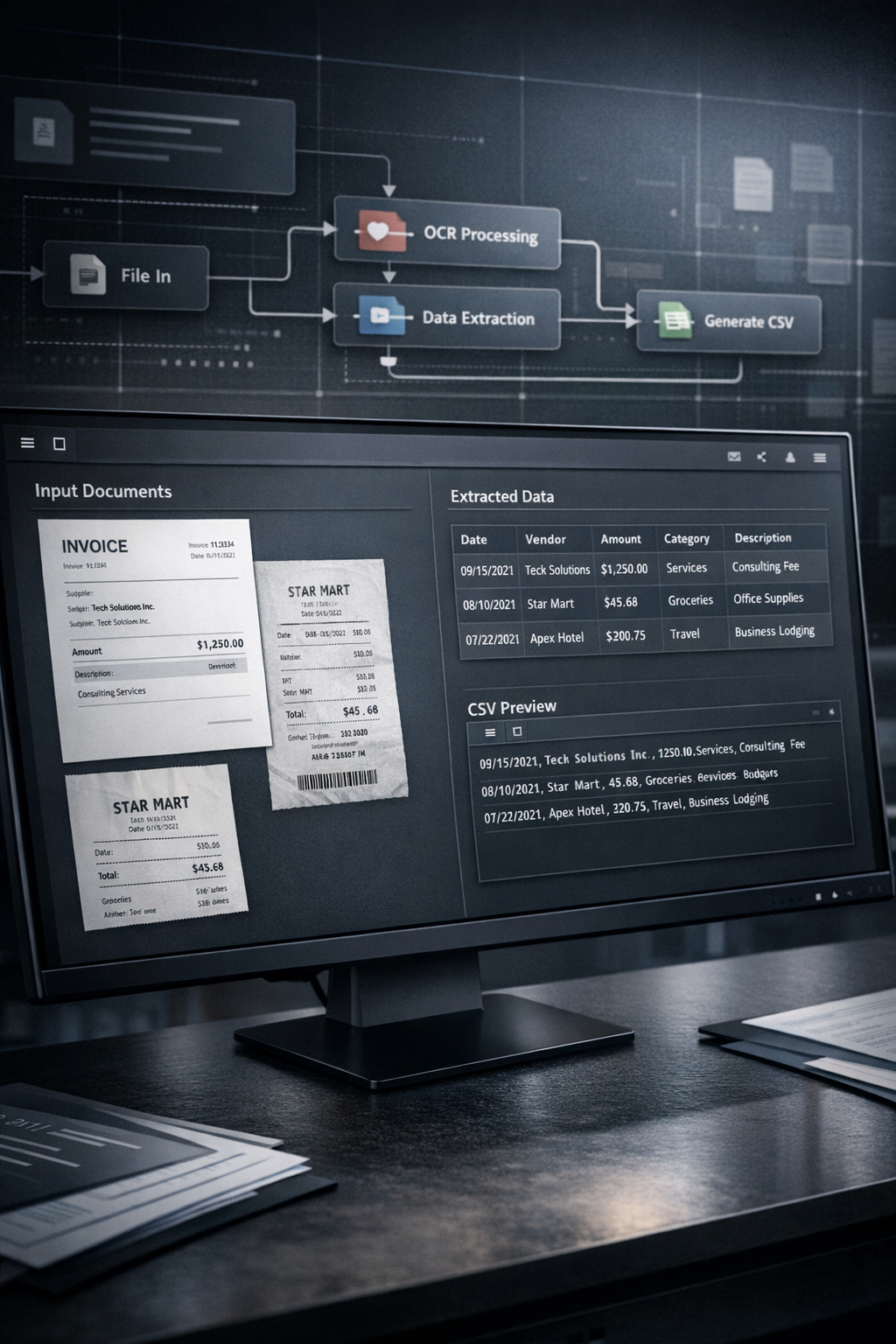
Organizations run on data — yet a large share of critical information still lives inside PDFs and images: invoices, bank statements, receipts, scans, and internal reports. This unstructured “document data” is valuable, but typically inaccessible to analytics and finance systems without manual work.
Manual extraction is slow, costly, and error-prone. It introduces delays, inconsistent formatting, and avoidable operational overhead.
This AI Agent™, built as an n8n workflow, solves the problem by automating end-to-end document intake, extraction, structuring, categorization, and CSV output — for both PDFs and image files.
The workflow operates fully inside your n8n environment and integrates directly with Google Drive to create a controlled, repeatable processing system. The pipeline begins the moment a new file is uploaded into a designated Drive folder.
A trigger monitors a specific Google Drive input folder. When a new file appears, the agent identifies the file type (PDF vs. image) and routes it into the correct processing path. This ensures the best model and extraction method is used for each format.
For PDFs, the agent extracts the document text and sends it to a large language model via API. The model is instructed to:
detect key fields (dates, vendors, amounts, descriptions)
identify transaction or line-item structure
apply categorization rules (e.g., expense type, transaction category)
return normalized, structured output suitable for CSV
For images, the agent uses a multimodal OCR capability (e.g., Google Vertex AI / Gemini) to accurately read text from scans and photos. The extracted text is then processed through the same structuring and categorization logic as the PDF flow.
This enables consistent output regardless of whether the source document is digital or scanned.
Once structured data is produced, the agent converts it into a clean CSV file and automatically uploads it into a specified Google Drive output folder.
The result is immediately usable for:
spreadsheets
accounting tools
BI dashboards
internal databases
automated reporting pipelines
Dual-format processing for PDFs and images with optimized routing
Data structuring with context, not just raw extraction
Categorization built-in, reducing downstream manual work
End-to-end Google Drive workflow, from input to output
Trigger-based automation, requiring no manual execution
Standardized CSV output compatible with virtually any system
Automate transaction extraction from bank statements and expense reports for reconciliation and reporting.
Convert receipts and invoices into structured entries for bookkeeping and expense tracking.
Extract structured data points from scanned reports, studies, and internal PDFs for analysis.
Digitize data from purchase orders, shipping documents, and forms to streamline back-office processing.
By converting unstructured PDFs and images into structured, categorized CSV outputs automatically, this AI Agent™ turns document handling into a reliable system — reducing manual labor while improving accuracy, speed, and data usability across the organization.
👉 Get Started Now
 Shopify Order Processor™ – AI-Powered Post-Purchase Automation for CRM, Billing & Email Campaigns
Original price was: $990.00.$77.00Current price is: $77.00.
Shopify Order Processor™ – AI-Powered Post-Purchase Automation for CRM, Billing & Email Campaigns
Original price was: $990.00.$77.00Current price is: $77.00.
 Agentic RAG AI Agent™ – AI Agent for Knowledge Automation, Intelligent Document Querying & Advanced Data Analysis
Original price was: $649.00.$97.00Current price is: $97.00.
Agentic RAG AI Agent™ – AI Agent for Knowledge Automation, Intelligent Document Querying & Advanced Data Analysis
Original price was: $649.00.$97.00Current price is: $97.00.
 TikTok Caption Engine™ – Bulk Upload Automation Framework
Original price was: $117.00.$57.00Current price is: $57.00.
TikTok Caption Engine™ – Bulk Upload Automation Framework
Original price was: $117.00.$57.00Current price is: $57.00.
 HR & IT Helpdesk Agent™ – AI Agent for Automated Policy Support, Voice Transcription & Intelligent Chat Assistance
Original price was: $916.00.$79.00Current price is: $79.00.
HR & IT Helpdesk Agent™ – AI Agent for Automated Policy Support, Voice Transcription & Intelligent Chat Assistance
Original price was: $916.00.$79.00Current price is: $79.00.
 AI Agent Setup Service™ – Expert Implementation & Environment Configuration for n8n AI Agents
Original price was: $2,497.00.$997.00Current price is: $997.00.
AI Agent Setup Service™ – Expert Implementation & Environment Configuration for n8n AI Agents
Original price was: $2,497.00.$997.00Current price is: $997.00.
 YouTube Repurposing Engine™ – Automated Blog Conversion Blueprint
Original price was: $227.00.$137.00Current price is: $137.00.
YouTube Repurposing Engine™ – Automated Blog Conversion Blueprint
Original price was: $227.00.$137.00Current price is: $137.00.
 TikTok Intel System™ – Automated Data Extraction Blueprint
Original price was: $257.00.$147.00Current price is: $147.00.
TikTok Caption Engine™ – Bulk Upload Automation Framework
Original price was: $117.00.$57.00Current price is: $57.00.
TikTok Intel System™ – Automated Data Extraction Blueprint
Original price was: $257.00.$147.00Current price is: $147.00.
TikTok Caption Engine™ – Bulk Upload Automation Framework
Original price was: $117.00.$57.00Current price is: $57.00.
 DM Sales Engine™ – High-Converting Lead Message Framework
Original price was: $127.00.$67.00Current price is: $67.00.
DM Sales Engine™ – High-Converting Lead Message Framework
Original price was: $127.00.$67.00Current price is: $67.00.
 InvoiceFlow™ – Automated Billing & Invoice Management System
Original price was: $287.00.$167.00Current price is: $167.00.
Shopify Order Processor™ – AI-Powered Post-Purchase Automation for CRM, Billing & Email Campaigns
Original price was: $990.00.$77.00Current price is: $77.00.
Agentic RAG AI Agent™ – AI Agent for Knowledge Automation, Intelligent Document Querying & Advanced Data Analysis
Original price was: $649.00.$97.00Current price is: $97.00.
TikTok Caption Engine™ – Bulk Upload Automation Framework
Original price was: $117.00.$57.00Current price is: $57.00.
HR & IT Helpdesk Agent™ – AI Agent for Automated Policy Support, Voice Transcription & Intelligent Chat Assistance
Original price was: $916.00.$79.00Current price is: $79.00.
AI Agent Setup Service™ – Expert Implementation & Environment Configuration for n8n AI Agents
Original price was: $2,497.00.$997.00Current price is: $997.00.
YouTube Repurposing Engine™ – Automated Blog Conversion Blueprint
Original price was: $227.00.$137.00Current price is: $137.00.
TikTok Intel System™ – Automated Data Extraction Blueprint
Original price was: $257.00.$147.00Current price is: $147.00.
TikTok Caption Engine™ – Bulk Upload Automation Framework
Original price was: $117.00.$57.00Current price is: $57.00.
DM Sales Engine™ – High-Converting Lead Message Framework
Original price was: $127.00.$67.00Current price is: $67.00.
InvoiceFlow™ – Automated Billing & Invoice Management System
Original price was: $287.00.$167.00Current price is: $167.00.
InvoiceFlow™ – Automated Billing & Invoice Management System
Original price was: $287.00.$167.00Current price is: $167.00.
Shopify Order Processor™ – AI-Powered Post-Purchase Automation for CRM, Billing & Email Campaigns
Original price was: $990.00.$77.00Current price is: $77.00.
Agentic RAG AI Agent™ – AI Agent for Knowledge Automation, Intelligent Document Querying & Advanced Data Analysis
Original price was: $649.00.$97.00Current price is: $97.00.
TikTok Caption Engine™ – Bulk Upload Automation Framework
Original price was: $117.00.$57.00Current price is: $57.00.
HR & IT Helpdesk Agent™ – AI Agent for Automated Policy Support, Voice Transcription & Intelligent Chat Assistance
Original price was: $916.00.$79.00Current price is: $79.00.
AI Agent Setup Service™ – Expert Implementation & Environment Configuration for n8n AI Agents
Original price was: $2,497.00.$997.00Current price is: $997.00.
YouTube Repurposing Engine™ – Automated Blog Conversion Blueprint
Original price was: $227.00.$137.00Current price is: $137.00.
TikTok Intel System™ – Automated Data Extraction Blueprint
Original price was: $257.00.$147.00Current price is: $147.00.
TikTok Caption Engine™ – Bulk Upload Automation Framework
Original price was: $117.00.$57.00Current price is: $57.00.
DM Sales Engine™ – High-Converting Lead Message Framework
Original price was: $127.00.$67.00Current price is: $67.00.
InvoiceFlow™ – Automated Billing & Invoice Management System
Original price was: $287.00.$167.00Current price is: $167.00.


