
Technical Analyst Agent™ – Automated Market Intelligence for Chart Analysis, Indicators & Price Action
January 26, 2026
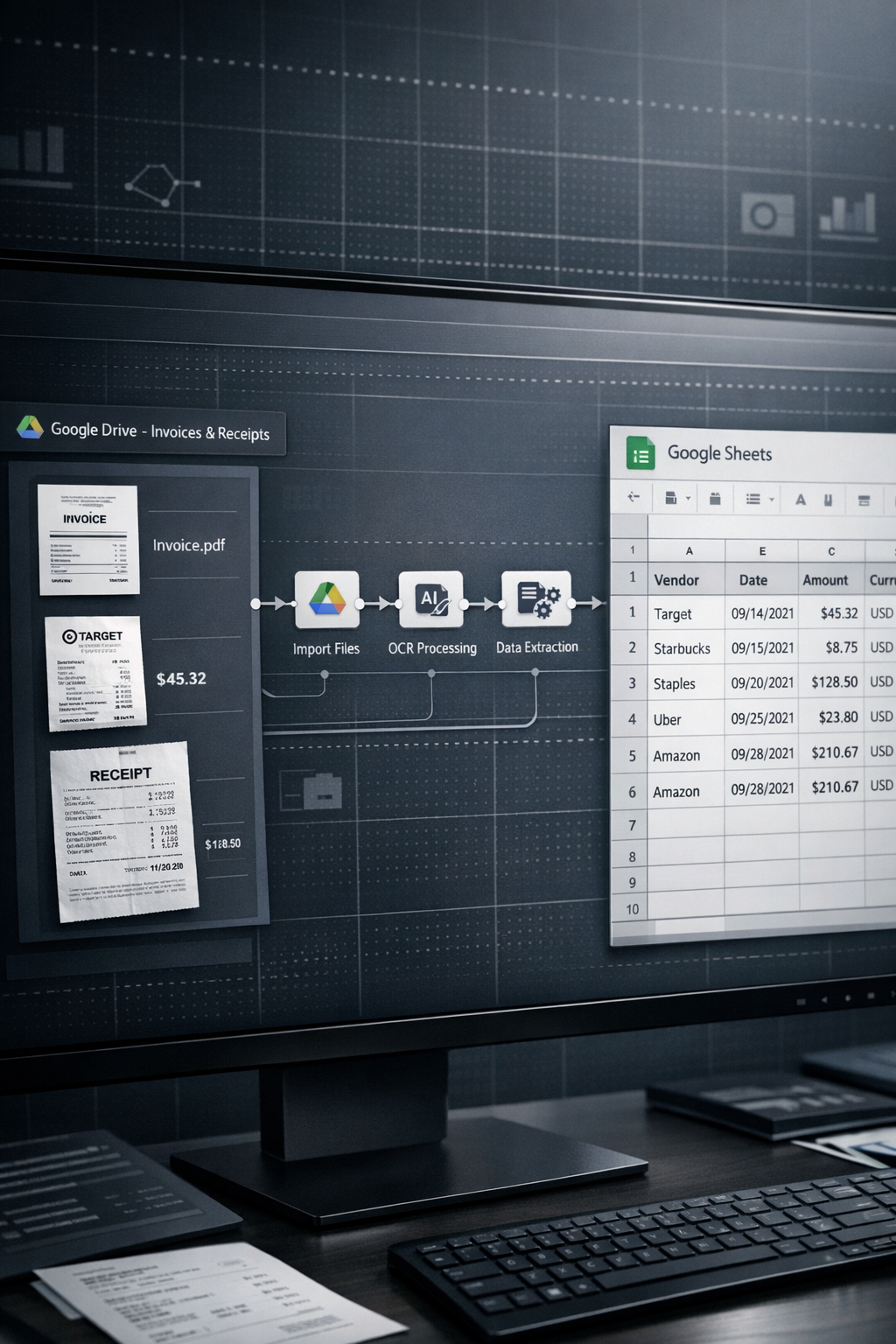
Manual data entry remains one of the most persistent productivity drains in modern finance operations. For small businesses, freelancers, and accounting teams, processing receipts and invoices is unavoidable — yet inefficient, repetitive, and highly susceptible to human error.
Every hour spent transcribing totals, dates, and vendor names from receipts into spreadsheets is an hour diverted from higher-value work. As document volume increases, this approach becomes increasingly fragile and unsustainable.
The OCR Data Extractor AI Agent™ replaces this manual workflow with a fully automated system that converts receipts and invoices into structured, reliable financial data — directly from Google Drive to Google Sheets.
Traditional expense handling follows a familiar pattern:
Collect physical or digital receipts
Manually read totals, dates, vendors, and line items
Open a spreadsheet or accounting system
Enter data by hand
Recheck entries for accuracy
This process introduces multiple failure points. Small errors compound into reporting inaccuracies, reconciliation issues, and compliance risks. As transaction volume grows, manual handling becomes a bottleneck that slows the entire financial operation.
The OCR Data Extractor AI Agent is built as a production-ready n8n workflow that automates the entire receipt processing pipeline — from document ingestion to structured spreadsheet output.
Once configured, the system operates continuously without manual intervention.
The workflow monitors a designated Google Drive folder. When a new receipt or invoice (PDF, PNG, JPG) is uploaded, the agent triggers instantly.
The file is securely downloaded within the n8n environment. Before processing, the agent checks existing Google Sheet entries to ensure the document has not already been processed, preventing duplicate records.
The agent sends the document to a specialized OCR API capable of understanding receipt and invoice layouts — not just raw text.
Key data points extracted include:
vendor name
total amount
currency
transaction date
line items (when available)
The API returns this information as structured JSON.
The structured response is parsed and normalized inside the workflow, preparing it for clean spreadsheet insertion.
The final output is appended as a new row in a designated Google Sheet, creating a continuously updated, structured expense ledger — ready for reporting, reconciliation, or export.
Manual data entry is eliminated entirely, freeing teams to focus on analysis, planning, and decision-making.
Automation removes transcription errors, ensuring consistent and reliable financial records.
Expenses are logged as soon as documents are uploaded, providing up-to-date financial insight.
Whether processing a handful of receipts or thousands per month, the workflow scales without additional effort or headcount.
This agent is particularly effective for:
small and mid-size businesses
accounting and bookkeeping teams
freelancers and consultants
operations teams managing high document volume
By turning unstructured receipts into structured financial data automatically, the OCR Data Extractor AI Agent transforms bookkeeping from a manual task into a reliable system.
👉 Get Started Now
 Shopify Order Processor™ – AI-Powered Post-Purchase Automation for CRM, Billing & Email Campaigns
Original price was: $990.00.$77.00Current price is: $77.00.
Shopify Order Processor™ – AI-Powered Post-Purchase Automation for CRM, Billing & Email Campaigns
Original price was: $990.00.$77.00Current price is: $77.00.
 Agentic RAG AI Agent™ – AI Agent for Knowledge Automation, Intelligent Document Querying & Advanced Data Analysis
Original price was: $649.00.$97.00Current price is: $97.00.
Agentic RAG AI Agent™ – AI Agent for Knowledge Automation, Intelligent Document Querying & Advanced Data Analysis
Original price was: $649.00.$97.00Current price is: $97.00.
 TikTok Caption Engine™ – Bulk Upload Automation Framework
Original price was: $117.00.$57.00Current price is: $57.00.
TikTok Caption Engine™ – Bulk Upload Automation Framework
Original price was: $117.00.$57.00Current price is: $57.00.
 HR & IT Helpdesk Agent™ – AI Agent for Automated Policy Support, Voice Transcription & Intelligent Chat Assistance
Original price was: $916.00.$79.00Current price is: $79.00.
HR & IT Helpdesk Agent™ – AI Agent for Automated Policy Support, Voice Transcription & Intelligent Chat Assistance
Original price was: $916.00.$79.00Current price is: $79.00.
 AI Agent Setup Service™ – Expert Implementation & Environment Configuration for n8n AI Agents
Original price was: $2,497.00.$997.00Current price is: $997.00.
AI Agent Setup Service™ – Expert Implementation & Environment Configuration for n8n AI Agents
Original price was: $2,497.00.$997.00Current price is: $997.00.
 YouTube Repurposing Engine™ – Automated Blog Conversion Blueprint
Original price was: $227.00.$137.00Current price is: $137.00.
YouTube Repurposing Engine™ – Automated Blog Conversion Blueprint
Original price was: $227.00.$137.00Current price is: $137.00.
 TikTok Intel System™ – Automated Data Extraction Blueprint
Original price was: $257.00.$147.00Current price is: $147.00.
TikTok Caption Engine™ – Bulk Upload Automation Framework
Original price was: $117.00.$57.00Current price is: $57.00.
TikTok Intel System™ – Automated Data Extraction Blueprint
Original price was: $257.00.$147.00Current price is: $147.00.
TikTok Caption Engine™ – Bulk Upload Automation Framework
Original price was: $117.00.$57.00Current price is: $57.00.
 DM Sales Engine™ – High-Converting Lead Message Framework
Original price was: $127.00.$67.00Current price is: $67.00.
DM Sales Engine™ – High-Converting Lead Message Framework
Original price was: $127.00.$67.00Current price is: $67.00.
 InvoiceFlow™ – Automated Billing & Invoice Management System
Original price was: $287.00.$167.00Current price is: $167.00.
Shopify Order Processor™ – AI-Powered Post-Purchase Automation for CRM, Billing & Email Campaigns
Original price was: $990.00.$77.00Current price is: $77.00.
Agentic RAG AI Agent™ – AI Agent for Knowledge Automation, Intelligent Document Querying & Advanced Data Analysis
Original price was: $649.00.$97.00Current price is: $97.00.
TikTok Caption Engine™ – Bulk Upload Automation Framework
Original price was: $117.00.$57.00Current price is: $57.00.
HR & IT Helpdesk Agent™ – AI Agent for Automated Policy Support, Voice Transcription & Intelligent Chat Assistance
Original price was: $916.00.$79.00Current price is: $79.00.
AI Agent Setup Service™ – Expert Implementation & Environment Configuration for n8n AI Agents
Original price was: $2,497.00.$997.00Current price is: $997.00.
YouTube Repurposing Engine™ – Automated Blog Conversion Blueprint
Original price was: $227.00.$137.00Current price is: $137.00.
TikTok Intel System™ – Automated Data Extraction Blueprint
Original price was: $257.00.$147.00Current price is: $147.00.
TikTok Caption Engine™ – Bulk Upload Automation Framework
Original price was: $117.00.$57.00Current price is: $57.00.
DM Sales Engine™ – High-Converting Lead Message Framework
Original price was: $127.00.$67.00Current price is: $67.00.
InvoiceFlow™ – Automated Billing & Invoice Management System
Original price was: $287.00.$167.00Current price is: $167.00.
InvoiceFlow™ – Automated Billing & Invoice Management System
Original price was: $287.00.$167.00Current price is: $167.00.
Shopify Order Processor™ – AI-Powered Post-Purchase Automation for CRM, Billing & Email Campaigns
Original price was: $990.00.$77.00Current price is: $77.00.
Agentic RAG AI Agent™ – AI Agent for Knowledge Automation, Intelligent Document Querying & Advanced Data Analysis
Original price was: $649.00.$97.00Current price is: $97.00.
TikTok Caption Engine™ – Bulk Upload Automation Framework
Original price was: $117.00.$57.00Current price is: $57.00.
HR & IT Helpdesk Agent™ – AI Agent for Automated Policy Support, Voice Transcription & Intelligent Chat Assistance
Original price was: $916.00.$79.00Current price is: $79.00.
AI Agent Setup Service™ – Expert Implementation & Environment Configuration for n8n AI Agents
Original price was: $2,497.00.$997.00Current price is: $997.00.
YouTube Repurposing Engine™ – Automated Blog Conversion Blueprint
Original price was: $227.00.$137.00Current price is: $137.00.
TikTok Intel System™ – Automated Data Extraction Blueprint
Original price was: $257.00.$147.00Current price is: $147.00.
TikTok Caption Engine™ – Bulk Upload Automation Framework
Original price was: $117.00.$57.00Current price is: $57.00.
DM Sales Engine™ – High-Converting Lead Message Framework
Original price was: $127.00.$67.00Current price is: $67.00.
InvoiceFlow™ – Automated Billing & Invoice Management System
Original price was: $287.00.$167.00Current price is: $167.00.


